|
My Account (Login Required)
Select Device - to forward DictoMail messagesMake Payment one-time payment at virtual ATMMy Invoices - configure recurring paymentsOrder Services - add more DictoMail numbers
Active Services - view your DictoMail service configurationsAvailable Services - view full catalog of other Admiral Online servicesAccount Balance - view charges & payment historySupport Cases - open/track 24hr support requests with Admiral OnlineFAQs - read knowledge base FAQ (frequently asked questions)
Web Menu Settings
Setup DictoMail messages to be broadcast to your cellphone, PDA, or pager
by selecting a feature setup from the Select Device link above. You can view all your DictoMail numbers and all configurations by logging into Active Services. Your browser must allow all cookies.
Voice Menu Settings
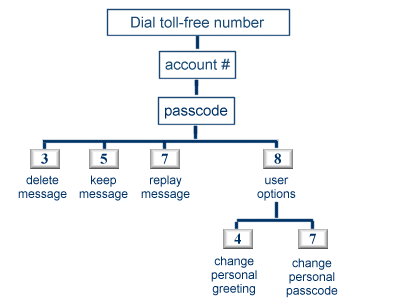
Call the main toll-free DictoMail access number. You will be greeted by the DictoMail automated
secretary. Enter your account number and passcode. She will guide you through all DictoMail voice functions using voice prompts. The diagram below shows a
summary of functions. Note more functions are available from the voice menu and are not displayed for security reasons.
|